
Tracking time away from work is a normal part of running any team, but it can become more complex as policies, headcount, and schedules evolve.
A clear leave system helps HR teams stay organized without relying on scattered notes or repeated follow-ups, as they can review leaves in a single system.
This blog looks at how absence management tools work, what features matter, and which software options can help offices manage employee absences more smoothly.
How Does Absence Management Software Help Manage and Track Employee Absences?
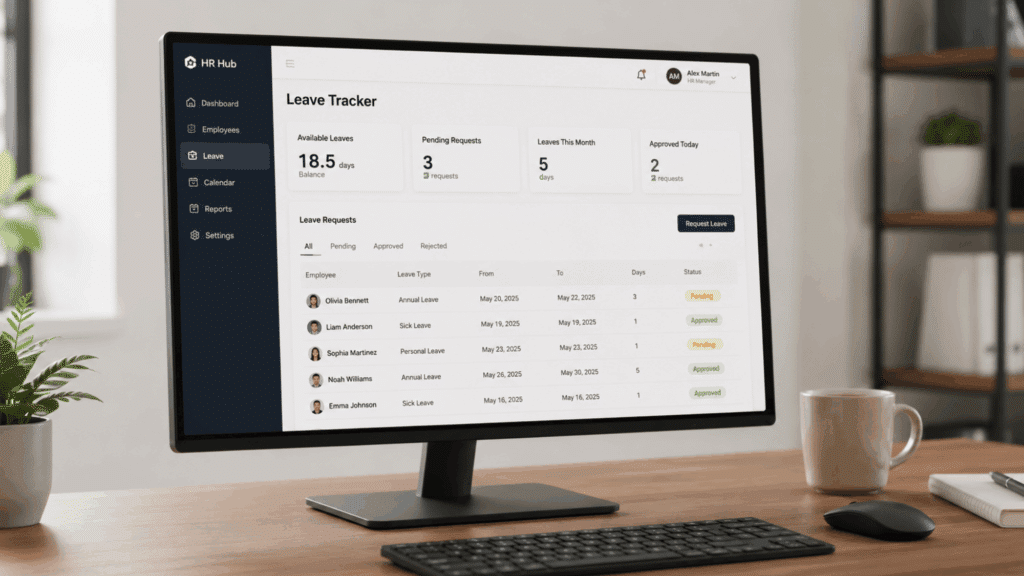
Absence management software gives employers one clear place to record paid time off, sick leave, personal days, unpaid leave, and other time-off requests.
It also helps employees check how much leave they have available before submitting a request, which reduces back-and-forth with HR.
Key features that make software diverse are:
- Payroll and time tracking integration: Sync approved leave with payroll to reduce manual data entry.
- Policy customization: Configure different PTO, holiday, and leave policies for various teams.
- Compliance support: Help document leave records in accordance with company policies
- Reporting and absence trends: Generate reports that identify attendance patterns
- Mobile access: Enable leave requests and approvals from smartphones and tablets.
- Team calendar visibility: Help managers avoid scheduling conflicts before approving leave.
Best Absence Management Software for Offices
Some platforms focus on simple PTO tracking, while others combine leave management with payroll, scheduling, and workforce planning.
Choosing software depends on company size, HR processes, and payroll requirements. These software programs are widely used by businesses looking to simplify employee leave administration.
1. UKG Ready
UKG Ready is designed for organizations that want workforce management, time tracking, and leave administration on a single platform.
It works particularly well for businesses managing larger workforces with multiple attendance policies.
Its Leave Manager helps HR teams track paid and unpaid leave, automate approvals, and connect leave data with timekeeping. This reduces duplicate data entry while giving employees visibility into their available balances.
2. ADP Workforce Now
ADP Workforce Now combines HR, payroll, scheduling, and leave management into a single workforce platform.
Businesses already using ADP payroll often appreciate having employee records connected across systems.
The platform supports time-off requests, attendance tracking, compliance tools, scheduling, and reporting, making it easier for HR teams to manage employee leave alongside payroll activities.
3. Workday HCM
Workday HCM is commonly used by enterprise organizations that need advanced HR management and workforce planning. It offers detailed visibility into employee leave across departments and locations.
Managers can review requests, monitor accruals, approve absences, and generate reports without relying on separate spreadsheets. Its centralized approach helps improve planning for larger organizations.
4. Rippling
Rippling combines HR, payroll, benefits, and IT management into a single platform. This makes it a practical option for businesses looking to reduce the number of systems they manage.
Its time-off tools allow employees to submit requests digitally, while managers can approve leave, monitor balances, and link approved absences to payroll and employee records.
More information: https://www.rippling.com
5. BambooHR
BambooHR is a popular choice for small and mid-sized businesses that want straightforward HR software without unnecessary complexity. Its interface is designed to be easy for both employees and HR administrators.
The platform supports holidays, PTO, sick leave, parental leave, approval workflows, and employee self-service, helping businesses organize leave requests more efficiently.
6. Paycom
Paycom focuses on payroll automation while offering integrated HR and workforce management tools. Businesses looking to reduce manual administrative work often choose it for its employee self-service capabilities.
Employees can submit leave requests directly through the platform, while managers review approvals and payroll teams automatically receive updated leave information via connected workflows.
7. Paylocity
Paylocity is built for businesses that want time, labor, payroll, and HR tools on a single platform. It works well for organizations that need employees and managers to stay connected through both desktop and mobile devices.
The software supports time and attendance tracking, leave requests, mobile clock-ins, scheduling, and workforce reporting. Its integrated approach can help HR teams keep attendance records more organized.
8. isolved
isolved combines HR, payroll, benefits, and workforce management into a single platform. It is well suited for businesses that want to track leave alongside other core HR functions.
Its leave management capabilities help organizations track employee requests, maintain documentation, improve communication, and support compliance with company policies and applicable regulations.
9. GoCo
GoCo is designed for growing businesses that need flexible HR software without a complicated setup. It offers customizable leave policies that can adapt to different teams and company requirements.
Employees can request time off through the platform, while managers receive approval notifications and HR can monitor leave balances from one dashboard.
Mobile access also makes submitting requests more convenient.
10. Homebase
Homebase is a practical option for small businesses and offices with hourly employees or shift-based schedules. It combines scheduling, attendance, and payroll into a single platform.
Managers can review time-off requests, adjust schedules, monitor attendance, and reduce scheduling conflicts before approving leave. The software also offers mobile access for employees on the go.
11. Buddy Punch
Buddy Punch focuses on attendance, time clocks, and paid time off tracking. It is a straightforward choice for businesses that want leave management without adopting a full HR suite.
The platform supports PTO accruals, employee leave requests, approval workflows, and attendance reporting. Its simple interface makes it approachable for smaller teams that want an easy-to-use solution.
If you are evaluating tools beyond just leave tracking, this breakdown of the best employee attendance tracker tools covers a wider range of options worth considering alongside absence management software.
Absence Management Software Vs Manual Tracking
As leave policies become more complex, automated systems can save time while reducing the risk of missed approvals or incorrect balance records.
| Aspect | Software | Manual Tracking |
|---|---|---|
| Leave requests | Online requests with one click | Email or paper forms |
| Approvals | Sent to managers automatically | Manual reminders and follow-ups |
| Balances | Updates instantly after approval | Prone to calculation errors |
| Payroll | Syncs with payroll systems | Requires manual data entry |
| Reporting | Generates real-time reports | Limited reporting options |
| Compliance | Keeps organized leave records | Records are easier to miss |
| Employee access | Employees check balances anytime | Employees depend on HR |
Wrapping it Up
Choosing the rightabsence management software can make everyday HR tasks easier for both employees and managers.
A centralized system helps maintain accurate balances and provides better visibility.
The best fit depends on your company’s size, budget, HR process, and the level of automation your team needs.
Before choosing a tool, look at the features your team uses most often and the gaps you want to fix. A good platform should support your current workflow while giving you room to grow.
Frequently Asked Questions
What Types of Leave Can Absence Software Track?
It can track PTO, sick leave, unpaid leave, parental leave, bereavement leave, holidays, and custom company leave types.
Is Absence Management Software only For Large Companies?
No. Many platforms offer plans for small and growing businesses, while others provide advanced features for larger organizations with more complex HR needs.
Can Absence Management Software Connect with Payroll?
Yes. Many solutions integrate with payroll and time-tracking systems, helping reduce manual data entry and improve payroll accuracy.
Can Absence Management Software Support Custom Pto Rules?
Yes, many tools let businesses create custom accruals, carryover limits, holidays, and leave categories.
Does Absence Management Software Help with Compliance?
Many platforms include documentation and reporting features that can help businesses maintain leave records and support compliance with company policies and applicable employment laws.