
What is an Applicant Tracking System?
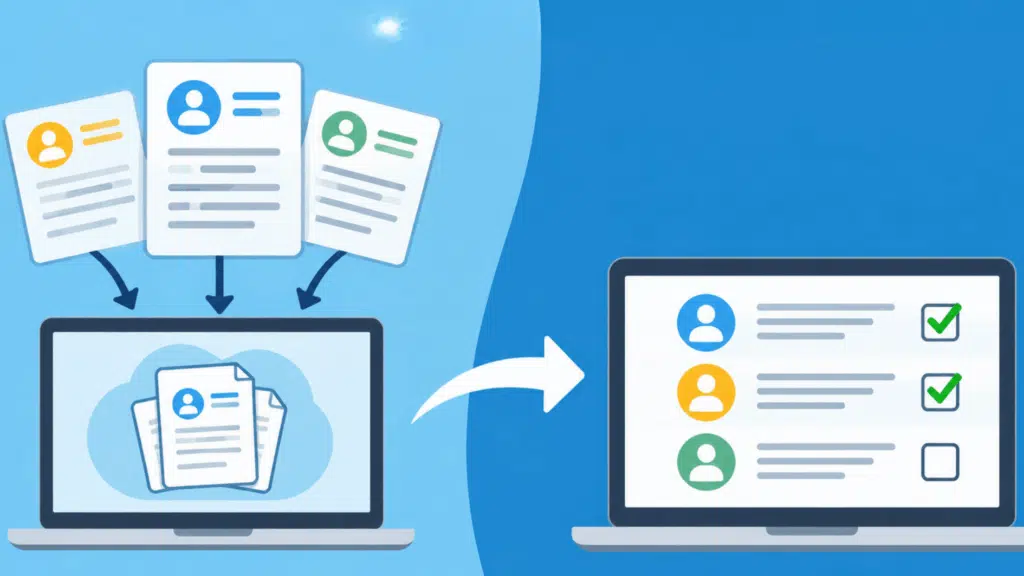
An applicant tracking system (ATS) is software that helps employers manage recruitment from a single platform.
It gives recruiters a clear view of job openings, candidate profiles, and hiring progress without switching between multiple tools.
For companies handling large numbers of applicants, an ATS reduces manual paperwork and helps hiring teams stay organized.
It also supports record-keeping requirements.
Under EEOC rules, covered U.S. employers generally must retain hiring records for at least one year, including records of candidates who weren’t hired.
How Does an ATS Work?
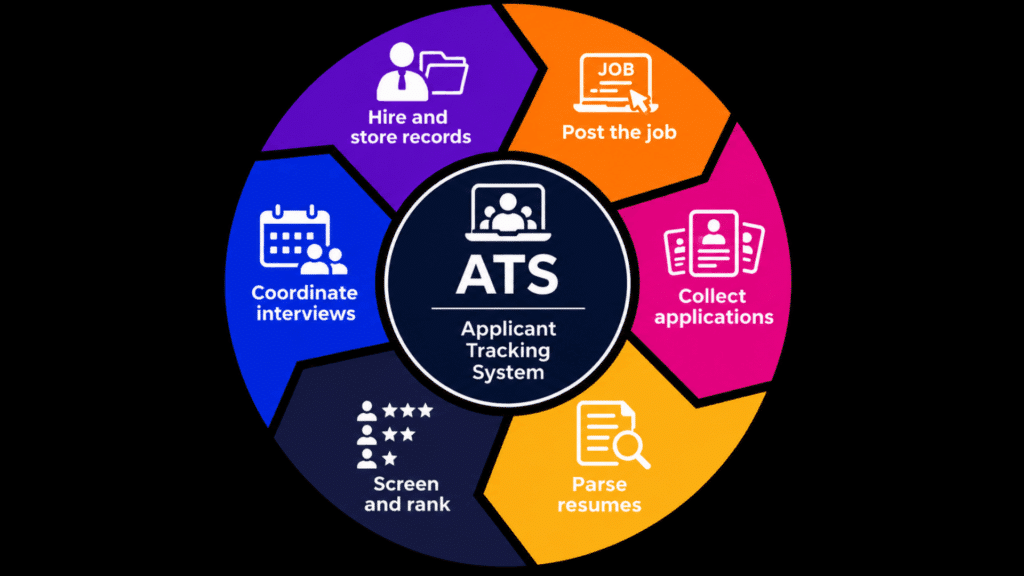
The hiring process follows six stages, with each stage helping employers move from an open position to a final hiring decision.
-
Post the Job: Recruiters write the job ad once, and the ATS sends it to the company’s careers page and job boards.
-
Collect Applications: Candidates apply online, and the system saves each resume, cover letter, and contact detail in one database.
-
Parse Resumes: The ATS reads each resume and pulls out details like job titles, skills, schooling, and years of experience.
-
Screen and Rank: Recruiters set filters or knockout questions, and the system sorts applicants by how well they match the role.
-
Coordinate Interviews: Hiring teams book interviews, share feedback, and leave notes, so everyone sees the same candidate history.
-
Hire and Store Records: The ATS sends the offer, then stores applicant files to maintain hiring records.
Who Uses an ATS and What Do They Use It For?
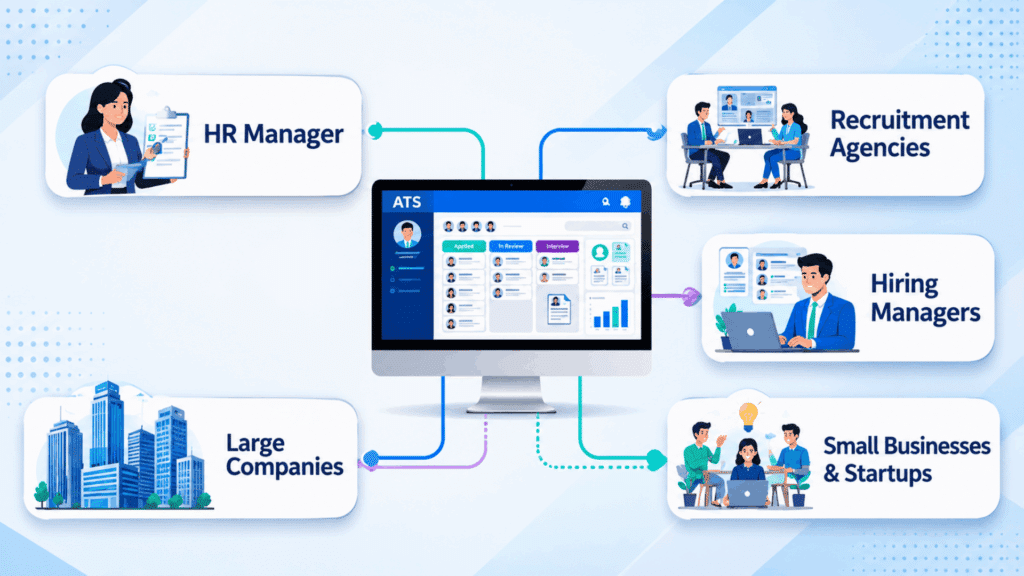
Different people involved in recruitment use an ATS based on their responsibilities. Recruiters manage applications, while hiring managers focus on selecting suitable candidates.
-
Recruiters: Handle day-to-day recruitment, communicate with applicants, and identify candidates who meet job requirements.
-
Hiring Managers: Evaluate candidates based on team needs, assess interview performance, and make hiring decisions.
-
HR Managers: Oversee recruitment policies, monitor hiring practices, and ensure company procedures are followed.
-
Staffing Agencies: Manage recruitment for multiple clients while keeping each company’s hiring requirements separate. Agencies handling temporary staffing also match available candidates with short-term assignments based on employer needs.
-
Job Seekers: Submit applications, provide personal details, and sometimes check their application status through an employer’s online portal.
Why is an Applicant Tracking System Important?
An applicant tracking system can improve hiring performance by reducing recruitment costs, shortening hiring timelines, and helping employers make more informed decisions.
-
Lower Recruitment Costs: Less administrative work can reduce labor expenses and help companies manage their hiring budgets.
-
Shorter Time-To-Hire: Faster hiring processes can help employers fill vacancies sooner and reduce disruptions caused by unfilled positions.
-
Better Hiring Decisions: Consistent evaluation criteria help employers compare applicants fairly and select candidates based on job requirements.
-
Improved Recruitment Planning: Hiring data helps HR teams identify busy recruitment periods, estimate staffing needs, and allocate resources.
-
Higher Recruiter Productivity: Recruiters can spend more time assessing candidates and building relationships instead of handling routine administrative work.
Key ATS Features to Look For
Beyond basic recruitment functions, certain features determine how well an ATS fits a company’s needs. Compare these before choosing software.
|
Features |
What to Look For |
Why It Matters |
|---|---|---|
|
HR Software Integration |
Connections with payroll, HRIS, and onboarding tools |
Reduces duplicate data entry |
|
Customization |
Adjustable hiring stages, forms, and permissions |
Fits different hiring procedures |
|
Data Security |
Encryption, access controls, and privacy settings |
Protects sensitive applicant information |
|
Reporting and Analytics |
Reports on hiring costs, recruitment sources, and time-to-hire |
Helps teams evaluate hiring performance |
|
Ease of Use |
Simple navigation and mobile accessibility |
Reduces training time |
|
Scalability |
Support for more users, job openings, and locations |
Accommodates business growth |
The U.S. Department of Labor’s inclusive hiring framework provides guidance on reducing accessibility barriers and discrimination risks associated with AI-powered recruitment tools.
Top 12 Applicant Tracking System Applications Worth Considering
Designed for large enterprises, this platform connects recruitment with broader HR operations. It supports candidate management, interview coordination, hiring approvals, and workforce planning.
Its main advantage is integration with Workday’s HR system, allowing hiring information to flow into employee records. This makes it useful for organizations managing recruitment across multiple departments and locations.
2. Greenhouse
Structured hiring is its standout feature. Recruiters can create interview kits, define evaluation criteria, and use candidate scorecards to collect consistent feedback.
It also provides scheduling, reporting, and recruitment integrations.
Growing companies that want a more organized interview process can use these tools to make hiring decisions based on defined job requirements rather than personal impressions.
Cost: Approximately $10,000–$75,000/year
3. iCIMS
Built for complex, high-volume recruitment, this platform supports applicant tracking, candidate relationship management, career sites, and recruitment communication.
Its strength lies in enterprise hiring capabilities and integrations with other HR systems.
Large employers in healthcare, retail, and financial services can use it to manage recruitment across different teams, locations, and job categories.
4. Lever
By combining applicant tracking with candidate relationship management, this software helps recruiters stay in touch with potential hires before positions become available.
It offers candidate sourcing, automated communication, interview coordination, and recruitment insights.
The main appeal is helping companies build lasting talent pipelines instead of starting their search from scratch whenever a vacancy opens.
5. Workable
This platform combines recruitment tools with AI-assisted candidate sourcing, screening, and communication. Teams can publish vacancies, review applicants, coordinate interviews, and manage offers.
Its standout feature is AI-supported recruitment, which helps reduce time spent on repetitive screening and follow-up tasks.
Suits small and mid-sized businesses looking to manage hiring without a large recruitment department.
Cost: $299–$599/month for companies with 1–20 employees; higher tiers cost more
6. BambooHR
An HR management platform with built-in applicant tracking, it connects recruitment with employee onboarding and other HR activities.
Teams can manage job openings, review applications, prepare offer letters, and organize new-hire information.
Its main advantage is keeping hiring and employee management within the same system, making it practical for businesses that prefer fewer separate HR tools.
Cost: $10.25–$25/employee/month for companies with over 25 employees
7. Zoho Recruit
Suitable for staffing agencies and in-house HR teams, this software offers resume parsing, candidate sourcing, interview management, and customizable recruitment workflows.
Its notable feature is Zia, an AI assistant that can suggest candidate matches based on job requirements and also provides client portals for staffing agencies and a free plan for basic recruitment needs.
Cost: Free–$75/recruiter/month, billed annually, depending on product edition
8. Ashby
Recruitment analytics are a major strength of this platform. It combines applicant tracking, candidate sourcing, interview scheduling, and reporting within one system.
Teams can examine hiring funnel performance, interview activity, and offer acceptance rates through customizable dashboards.
Cost: Starting at $400/month; larger plans require custom quotes
Designed to support enterprise talent acquisition, this platform offers job distribution, candidate screening, interview scheduling, offer management, and recruitment automation.
Its distinguishing feature is Winston, an AI-powered recruiting solution that supports candidate matching and other hiring activities.
Organizations with recruitment teams spread across different locations may find its centralized workflows useful.
Cost: Custom pricing; a previously published plan started at $14,995
10. JazzHR
Built for small businesses, this software provides job posting, candidate tracking, interview assessments, and digital offer management.
The main selling point is a simpler hiring process without the complexity of enterprise recruitment platforms. Small teams can organize applications and manage recruitment without needing a dedicated HR technology specialist.
Cost: $1,000–$5,508/year, billed annually
11. Recruitee
Collaboration is central to this recruitment platform. It provides customizable hiring pipelines, candidate evaluations, career site tools, and team-based recruitment workflows.
Hiring managers and recruiters can collaborate on applicant reviews and hiring decisions.
Cost: Approximately $270–$1,374/month
12. Teamtailor
This platform combines applicant tracking with employer branding tools. Businesses can create branded career sites, manage candidate relationships, automate recruitment tasks, and organize interviews.
The standout feature is the focus on candidate experience and company presentation. Businesses that want their careers page to reflect their workplace culture can use it alongside their regular hiring activities.
Conclusion
An applicant tracking system brings your whole hiring process into one place. It posts jobs, sorts resumes, schedules interviews, and keeps the records your team needs for compliance.
A large enterprise may need Workday or iCIMS, while a smaller team might get more from Workable, BambooHR, or Zoho Recruit.
Whichever you pick, look for resume parsing, easy scheduling, collaboration tools, and solid reporting. Ready to simplify your hiring?
Shortlist two or three tools from our list, book demos, and see which one fits the way your team works.
Frequently Asked Questions
Does an ATS Automatically Reject Resumes?
Usually not. Most ATS tools organize resumes for recruiters, who make the final call. Knockout questions are the exception.
How Do I Make My Resume ATS-Friendly?
Use a simple layout, standard headings, and keywords from the job post. Avoid tables, graphics, and text boxes.
How Much Does an ATS Cost?
Prices depend on the plan and on how many recruiters use it. Zoho Recruit, for example, has a free plan, and its paid Corporate HR plans are listed at $30 and $60 per user per month.
Is an ATS Worth It for a Small Business?
Yes, if you hire regularly or get many applicants per role. Free or low-cost plans keep the risk low.
What’s the Difference Between an ATS and an HRIS?
An ATS manages candidates before they’re hired. An HRIS manages employee records, benefits, and payroll after hiring.