


Every option on your shortlist wins at something. The job pays more, the software saves time, the vendor is easier to work with.
Gut instinct picks a favorite fast, but it can’t explain the choice to your team or defend it months later. A weighted decision matrix turns that tug-of-war into a decision you can stand behind.
Below, you’ll learn how to build one step by step, see a worked example, and find out when it’s the right tool to use.
What is a Weighted Decision Matrix?
A weighted decision matrix is a scoring table that ranks options against a set of criteria, giving the most influence to the criteria that matter most.
Each option is scored on every criterion, each score is multiplied by that criterion’s weight, and the results are added into a single total. The highest total marks the best fit.
It’s a simple form of multi-criteria decision analysis, and you’ll also see it called a weighted scoring model or a decision grid.
Options usually run down the side, criteria across the top, and weights sit above each criterion, so the full comparison fits on one page.
Unlike a pros and cons list, which treats every point as equal, the matrix shows how much each factor moved the result.
How to Create a Weighted Decision Matrix
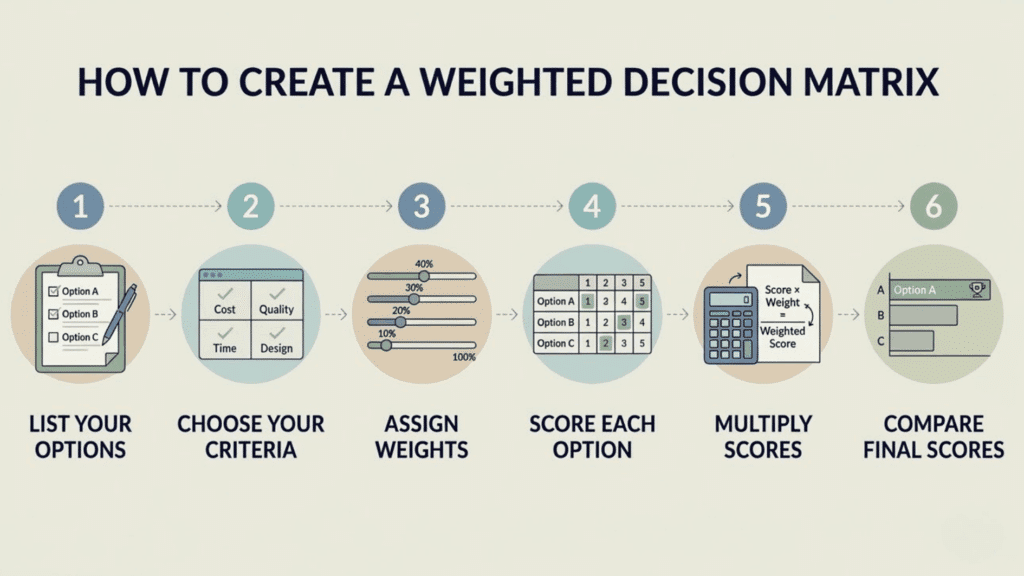
No special software is needed to build one. A spreadsheet or a sheet of paper is enough, and a short list of options usually takes less than an hour.
Work through the steps below in order, since each one depends on the one before it.
Step 1: List Your Options
Write down every choice you’re seriously considering. Three to six options is a manageable range, since a longer list makes scoring slow and less careful.
Remove any option that fails a must-have, such as going over your budget, before it reaches the table.
Step 2: Choose Your Decision Criteria
Criteria are the factors that will decide the outcome, like cost, quality, or setup time. Aim for four to seven.
Each one should be easy to judge, and no two should overlap. “Price” and “affordability” measure the same thing, so using both would count it twice and skew the result.
Step 3: Assign a Weight to Each Criterion
Give every criterion a weight that shows how much it matters. The simplest method is percentages that add up to 100, so cost might get 40% while design gets 10%.
If percentages feel awkward, rate each criterion’s importance from 1 to 5 instead. To turn those ratings into percentages, divide each one by the total. Ratings of 5, 3, and 2 add up to 10, so they become 50%, 30%, and 20%.
Set the weights before you score anything. Weighting afterward makes it easy to tilt the numbers toward the option you already like.
Step 4: Score Each Option
Rate every option against each criterion on one fixed scale, such as 1 to 5. Decide upfront what each number means, so a 5 always signals “fully meets the need.”
In a team, have everyone score alone first, then average the results.
Step 5: Multiply Scores by Weights
Once you have scored all the options, multiply each score by its corresponding criterion weight. This gives you the weighted score for each factor.
For example, if an option scores 4 for a criterion weighted at 30%, the weighted score is 1.2 (4 × 0.30). Repeat this calculation for every criterion and option.
Step 6: Add Up and Compare the Totals
Add the weighted scores for each option to get its final score. The option with the highest score is your front-runner, but if the top two are close, check whether small weight changes would flip the ranking before you decide.
Real-Life Example of Weighted Decision Matrix Example
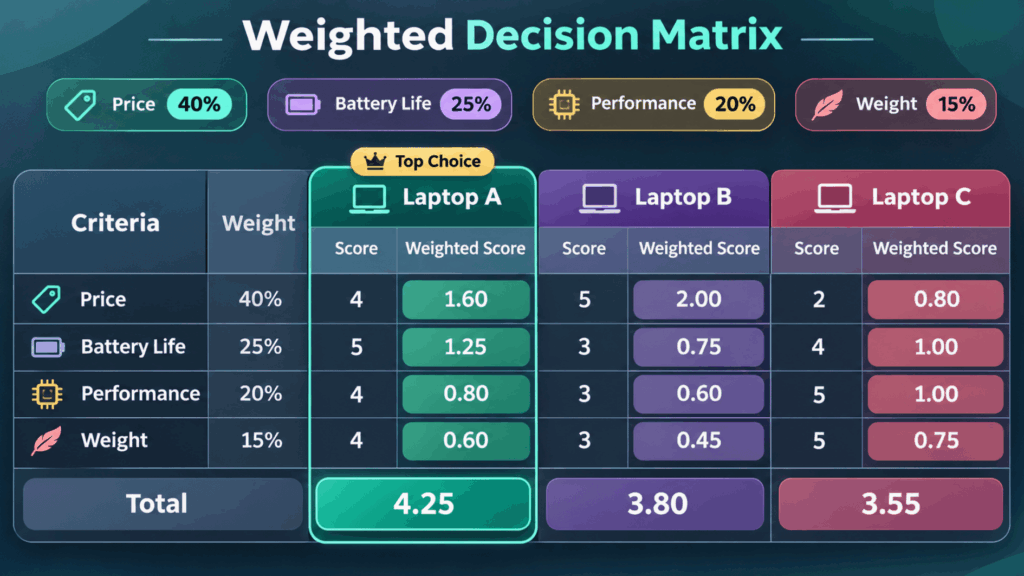
Example 1: Choosing a Work Laptop
Say you’re buying a work laptop and have narrowed it to three models.
Price matters most at 40%, followed by battery life (25%), performance (20%), and weight (15%). Each laptop is scored from 1 to 5 on every criterion, with weighted scores shown in brackets.
Laptop A comes out on top with a score at 4.25, even though Laptop B is the cheapest.
|
Criteria (Weight) |
Laptop A |
Laptop B |
Laptop C |
|---|---|---|---|
|
Price (40%) |
4 (1.60) |
5 (2.00) |
2 (0.80) |
|
Battery Life (25%) |
5 (1.25) |
3 (0.75) |
4 (1.00) |
|
Performance (20%) |
4 (0.80) |
3 (0.60) |
5 (1.00) |
|
Weight (15%) |
4 (0.60) |
3 (0.45) |
5 (0.75) |
|
Total |
4.25 |
3.80 |
3.55 |
Example 2: Hiring a Customer Support Team Lead
Say an HR manager has three shortlisted candidates for a team lead role. The manager weighs four qualities employers look for: relevant experience (35%), communication skills (25%), leadership potential (25%), and problem-solving (15%).
Three interviewers score each candidate from 1 to 5, and the averages appear in the table.
Candidate A comes out on top at 4.00, even though Candidate B has the most experience.
|
Criteria (Weight) |
Candidate A |
Candidate B |
Candidate C |
|---|---|---|---|
|
Relevant Experience (35%) |
4 (1.40) |
5 (1.75) |
3 (1.05) |
|
Communication Skills (25%) |
5 (1.25) |
3 (0.75) |
4 (1.00) |
|
Leadership Potential (25%) |
3 (0.75) |
3 (0.75) |
4 (1.00) |
|
Problem-Solving (15%) |
4 (0.60) |
3 (0.45) |
5 (0.75) |
|
Total |
4.00 |
3.70 |
3.80 |
Candidate A leads Candidate C by only 0.20, so the hiring team should check whether a small change in weights would flip the result before making an offer.
When Should You Use a Weighted Decision Matrix?
Use it when you’re choosing between two or more comparable options and some factors matter more than others.
It works best when the decision carries real cost, involves more than one person, or needs a clear record of why one option beat the rest. Common situations where it fits well:
Project Selection
Rank competing project proposals by cost, timeline, available resources, and fit with company goals.
Vendor or Supplier Choice
Compare suppliers on price, lead time, setup fees, and after-sale support before signing a contract.
Hiring Decisions
Score shortlisted candidates against the same criteria so every interviewer judges the same things (as HR Simple’s interview framework recommends)
Location Planning
Weigh possible office or warehouse sites by rent, local workforce, employee relocation costs, and distance to suppliers.
Feature or Campaign Prioritization
Decide which product features or marketing ideas to pursue first based on impact, effort, and customer demand.
Major Personal Purchases
Choose between houses, cars, or colleges when price, location, and long-term fit pull in different directions.
Weighted Vs Unweighted Decision Matrix
Use a weighted matrix when some factors matter more than others. An unweighted one is enough when every factor counts equally.
|
Features |
Unweighted Decision Matrix |
Weighted Decision Matrix |
|---|---|---|
|
Treatment of factors |
All factors are given equal importance and consideration. |
Each factor is assigned a weight based on its importance or priority. |
|
Scoring |
Options are rated against each factor. |
Rate options against each factor, and assign each factor a weight. |
|
Calculation |
Add the scores to get the final total. |
Multiply each score by its weight and add the results. |
|
Time required |
Quick and easy to create and use. |
Takes more time to set up and calculate. |
|
Best suited for |
Everyday decisions where all factors are equally important. |
Complex decisions involving different priorities and trade-offs. |
What are the Limitations of a Weighted Decision Matrix?
A weighted decision matrix turns judgment calls into numbers, so its biggest limitation is that the final score can look more certain than the thinking behind it.
-
Scores Are Still Opinions: A 4 out of 5 reflects one person’s view. Note why you gave each score.
-
High Totals Can Hide a Deal-Breaker: Strong scores can offset one very low score, so recheck any 1 before deciding.
-
Linked Factors Need Separate Rows: A low price may bring high upkeep, which the table misses unless upkeep is its own criterion.
-
Missing Items Go Unnoticed: The matrix only ranks what you list, so a skipped option or factor skews the result.
-
Risk Isn’t Built In: Future problems, like a price jump, count only if you add risk as a criterion.
-
Intangibles are Hard to Score: Factors like team morale often get guessed or dropped, even when they matter.
The Bottom Line
A weighted decision matrix won’t make a choice for you, and it isn’t meant to. Its real value is the conversation it forces about what matters and why.
If the top-scoring option leaves you uneasy, treat that feeling as useful information. Often it means your weights don’t match what you actually care about.
Adjust them, rescore, and see whether your gut and the numbers start to agree. The best way to get comfortable with the method is to use it on a decision you’re facing right now.
Pick one with a few clear options, open a blank spreadsheet, and give yourself 30 minutes to fill it in.
Frequently Asked Questions
Does the Matrix Work with Only Two Options?
Yes. A weighted decision matrix works for two options and multiple choices. It helps compare trade-offs objectively when both options have different strengths and weaknesses.
How Do You Calculate a Weighted Decision Matrix in Excel?
Enter your weights in one row (for example, B2:E2) as decimals that add up to 1. Enter each option’s scores in the rows below, then type =SUMPRODUCT($B$2:$E$2, B3:E3) in the total column and copy it down. SUMPRODUCT multiplies each pair of matching cells and adds the results, giving you the weighted total.
What Should You Do if Two Options Tie?
Compare their scores on your highest-weighted criterion first. If they’re still level, recheck any score you were unsure about, or add a tie-breaker criterion such as risk or upkeep cost.